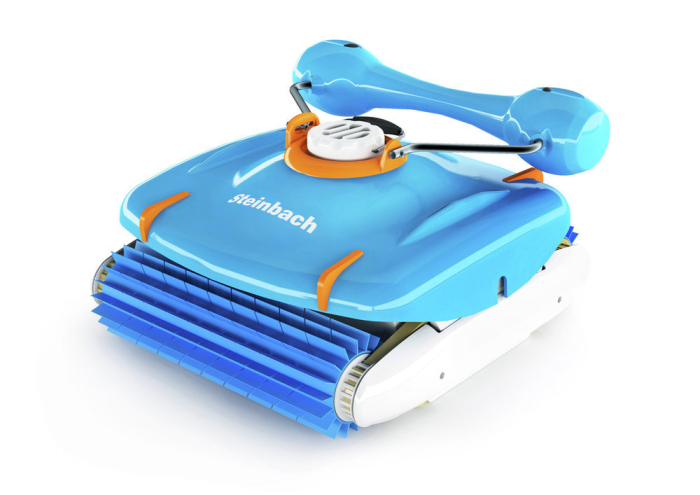
Swimming pool cleaner RX 5

  • Integrated cleaning system
  • High performance system with 15.500 l/h
  • Fully automatic or manual cleaning mode
  • For floor and wall cleaning
€99,999.99

Description

With the Steinbach swimming pool cleaner RX 5 unit, you have a fully automatic cleaner for your pool. Special plastic brushes clean both the floor and the wall. With an integrated filter unit, combined with a 24 V 15,500 l/h power high performance pump, connection to an external filter unit is not required. Control can be both fully automatic and manual. The cable connecting the floor cleaner and control unit is approx. 16 m long. This makes it easy to clean pools up to 6 x 12 m.

ATTENTION ! Not suitable for overflow, - stainless steel, - tile pools.
Technical Information

Cleaning area
floor cleaning
wall cleaning
waterline
Operating mode
control unit with cable
App control
no
Area of application: Wet area
Connection type: no
App name (App Store): nein
Cable length to unit: 18,00 m
Article number: 061018

Please note that the products shown represent the current scope of delivery, as of 2026.

Videos

FAQ

A simultaneous flashing of the LEDs on the control unit is not a fault, but means that the vacuum cleaner has finished the selected cleaning program. A flashing display (e.g. S - flashing) means that the selected cleaning program is active.

To prevent the floating or power cable from becoming tangled or twisted, only place as much cable into the water as the pool cleaner actually needs to reach all areas of the pool. Remove any excess cable from the water and place it at the poolside. Also make sure to remove obstacles such as pool ladders from the pool to prevent the cable from getting caught or twisting further.
After each use, remove the cable from the pool, rinse it with clean water to remove any pool chemical residues, and disconnect it from the control unit. The cable should then be untwisted or laid out straight and stored neatly coiled.

If your pool robot is not climbing the walls, this is usually not due to a defect, but rather external conditions or a need for maintenance.

Please check and consider the following points:

  • Check which cleaning mode is selected on the device. You may currently have a mode selected that does not include wall cleaning.
  • First, thoroughly clean the filter container or filter bag, as dirt can reduce performance. Also remove slippery deposits such as algae from the pool walls, as these reduce the robot’s grip.
  • In addition, check the wheels, drive belts, and brushes for wear or dirt and replace them if necessary.
  • Make sure that when placing the device into the water, all air is fully released before switching the robot on.
  • For optimal performance, the water temperature should be between 10 °C and 35 °C, and the pH level should be set between 7.0 and 7.4.

For the heavier pool robot models Poolrunner APPcontrol and Smart RXB 450, the included buoyancy aids can also be installed to support wall-climbing performance through additional buoyancy.

By following these steps, the wall-climbing function is usually restored reliably in most cases.

If your pool robot does not reach all areas of the pool, this is usually not due to a defect, but rather to its operating principle and usage conditions. The pool robot moves in a random pattern, so complete pool coverage depends on running time. In larger pools, it may happen that after one cleaning cycle some areas are not yet covered.

  • Switch off the filter pump shortly before and during operation of the pool robot. This allows dirt particles to settle on the pool floor, enabling the cleaner to work more efficiently.
  • It is also recommended to clean the debris container before each cleaning cycle, as contamination can also reduce cleaning performance.
  • Increase the cleaning time to give the robot sufficient time to clean all areas of the pool.
  • For battery-powered devices, it is recommended to fully charge the pool robot before use to ensure maximum cleaning performance.
  • For cable-connected devices, make sure that enough cable is placed in the pool so the cleaner can reach all areas. At the same time, only place as much cable into the water as necessary to avoid twisting of the floating cable.
  • Depending on the model, you can also adjust the nozzle or wheel settings. This changes the cleaning radius and helps the robot reach different areas more effectively. Please always refer to the user manual for correct adjustment instructions.

By following these measures, you can significantly improve cleaning performance and achieve better overall pool coverage.

If your corded pool robot is no longer functioning properly or is not moving correctly, this is often not caused by a defect, but rather by power supply issues, dirt buildup, or external influences.

Please check the following points:

  • First, make sure that your pool robot is correctly connected to the control unit and that the control unit is properly connected to the mains power supply. If possible, plug the control unit directly into a wall socket and avoid using extension cords.
  • Also check your household power supply for possible overloads or a defective socket. If you suspect an electrical fault, please contact a qualified electrician.
  • Inspect the pool for obstacles such as ladders, severe liner wrinkles, or other objects where the pool robot could get stuck. Uneven pool floors or pronounced wrinkles may restrict cleaning performance and driving behavior. If necessary, the cleaning lips can be removed to reduce the risk of the robot getting caught on the pool liner.

A common cause of malfunctions is dirt or debris inside the device. Hair, fibers, or similar residues can block the water outlet nozzle, propeller, impeller, pump shaft, rollers, or the base plate. This can significantly reduce pump performance, causing the cleaner to operate poorly, stop rotating, or remain stationary.

Therefore, regularly clean:

  • the filter unit and debris flap,
  • the water outlet nozzle and propeller,
  • the impeller and shaft,
  • the rollers or wheels,
  • as well as the device’s base plate.

During extended use, the wheels and drive belts should also be checked regularly for wear and for foreign objects in the drive system. Replace worn parts if necessary.

Documents

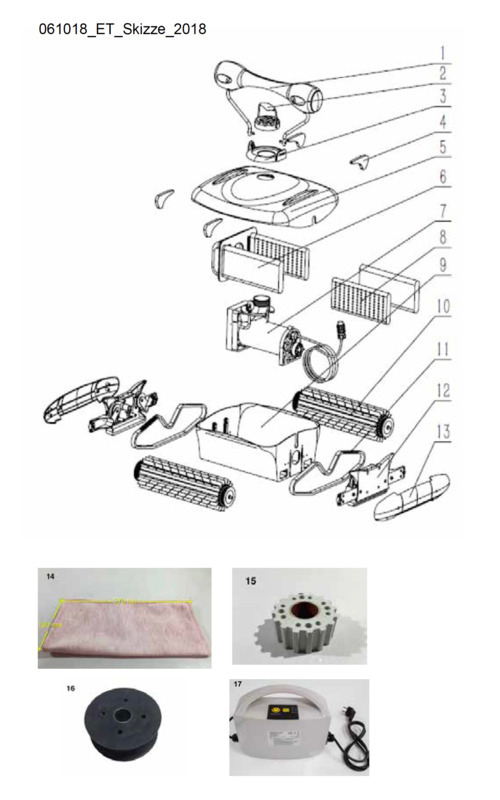
Spareparts

Looking for the matching spare part?

Additional Information

Product images are for reference only and may not be an exact representation of the product.